How to Download M3U8 / HLS Videos in Chrome

There is a simple way to download an HLS video in Chrome: install MAX Video Downloader (free) and click Download on the page with the video.
That’s it.
Or you can do it manually (who are you, warrior?).
You’ll need to find the M3U8 playlist, work out what it actually points to, retrieve the media segments, possibly do the same thing again for audio, handle decryption and eventually turn all of that into the video file you wanted in the first place.
I’m serious, just install MAX.
Still want the manual part? Good. Let’s see what that Download button is saving you from.
The M3U8 is a map, not the video
The first problem is that an HLS video usually isn’t sitting on the server as one convenient video file waiting for you to download it.
HLS (HTTP Live Streaming) splits media into segments and describes them with text playlists. A media playlist lists the segments of a particular stream in playback order. A master playlist can point to several other playlists for different video qualities, audio tracks, or subtitles. The HLS specification defines these playlist types and how their segment URIs work.
So when you find something like:
master.m3u8
you may have found instructions for finding more instructions.
Eventually, those instructions lead to the actual media:
segment001.ts
segment002.ts
segment003.ts
...
A short video might reference dozens of segments. A long one can reference hundreds or thousands, depending on how the stream is packaged. There is no useful fixed number.
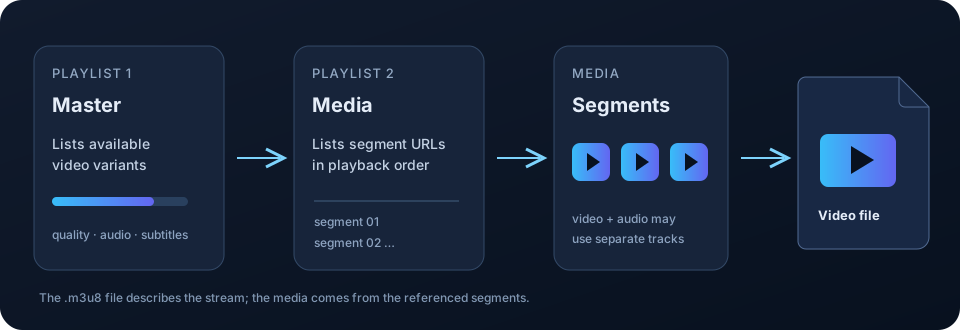
If you save the .m3u8 directly and Chrome gives you a tiny text file, nothing went wrong. You successfully downloaded the playlist. Congratulations.
Unfortunately, you wanted the video.
So now we need the segments.
Fine. Download all the segments
Once you have the relevant media playlist, the basic job sounds reasonable enough.
Read the playlist, resolve the segment URLs, download every referenced piece in the correct order, preserve the timing, and produce continuous media from them.
Some segment URLs are absolute. Others are relative to the playlist URL. Depending on the stream format, the playlist can also reference initialization data needed before the media segments can be interpreted correctly. In other words, this is not necessarily a matter of downloading a folder full of files and concatenating them until VLC stops complaining.
Live HLS adds another complication. A video-on-demand playlist normally describes a finite presentation. A live playlist can keep changing as new segments appear, while older ones may disappear from its sliding window. Apple’s HLS playlist examples show both VOD and sliding live playlists.
That means recording a live stream can require repeatedly following the playlist as it changes. If an older segment has fallen out of the playlist and the server no longer serves it, finding the M3U8 later does not bring that segment back.
Still manageable.
Except we have quietly assumed that those segments contain everything you need.
Sometimes they don’t.
Downloaded the video? Great. Where’s the audio?
An HLS master playlist can describe several video variants and separate audio renditions. A site might offer 1080p, 720p, and 480p video alongside separate English and Japanese audio playlists, plus subtitles.
The Apple HLS examples show exactly this kind of arrangement with video associated with separate audio renditions.
So you can correctly find a video playlist, correctly download every segment, correctly process the result – and get a perfectly silent video.
Nothing failed. You downloaded the video stream (you wanted audio too?).
Now you need to identify the appropriate audio rendition, download its segments as well, and combine the resulting audio and video tracks.
That operation is muxing.
And no, that does not necessarily mean converting the video.
Please don’t transcode everything
This distinction matters because “turn these streams into an MP4” and “re-encode this video” are not the same operation.
If the video and audio are already encoded in codecs suitable for the output, they can often be remuxed: their encoded packets are placed into a new container without decoding and encoding the media again.
Conceptually:
encoded video + encoded audio → mux → output file
No generation of video quality needs to be thrown away just because the source arrived as HLS segments.
FFmpeg calls this streamcopy: packets are copied without decoding or encoding. It is fast and preserves the source encoding.
Transcoding is different:
encoded video → decode → raw media → encode → new encoded video
That costs considerably more processing and, when a lossy codec is involved, can introduce another generation of quality loss. Transcoding is useful when you actually need to change the codec or transform the media. It should not be the default response to discovering an M3U8.
So: download the streams, preserve their original encoding when possible, and mux them into an appropriate output.
Easy.
Well, the word appropriate is doing some work there.
Your file extension does not negotiate with the codecs
MP4, MKV, and WebM are containers. They describe how media tracks and related information are packaged into a file.
H.264, HEVC, AV1, and VP9 are examples of video codecs. AAC and Opus are examples of audio codecs.
Those are different layers of the problem.
Successfully downloading a video stream and an audio stream does not guarantee that you can put that exact combination into whichever container you prefer, nor does it guarantee that the resulting combination will play on every browser, phone, television, editing application, or operating system.
The sensible order is:
- Preserve the original streams and remux them when the target container and player support them.
- If the codecs are fine but the container is a poor fit, use another compatible container.
- Transcode only when actual codec compatibility requires it.
Yes, we are still trying to download a video from a webpage.
And we haven’t talked about whether the server will actually let your new downloader fetch all those URLs yet.
Having the M3U8 does not mean having access to the video
A playlist tells a client where media resources are. It does not necessarily carry everything that made the browser’s original requests work.
A site can use signed URLs that expire. Segment requests may depend on the same authenticated session as the webpage. The server may expect cookies or request headers such as Referer that were present when the browser played the video.
So this can happen:
- The video plays perfectly in Chrome.
- You find the M3U8.
- You copy it into another tool.
- The server responds with
403 Forbidden.
The URL wasn’t necessarily wrong. Your new request simply wasn’t the same request the authorized browser session was making.
HLS can also describe encrypted media. For example, EXT-X-KEY can specify AES-128 encryption and provide information an authorized client needs to obtain the key and decrypt affected segments.
Standard HLS encryption and DRM are not the same thing. Supported encryption can be part of a normal HLS playback workflow; DRM introduces a separate protection system and authorization boundary. MAX does not support DRM-protected media and cannot bypass site access controls.
So at this point our innocent little “download video” project involves playlist parsing, URL resolution, segment retrieval, live playlist updates, track selection, session-aware requests, possible decryption, muxing, containers, codecs and maybe transcoding.
This is usually the point where FFmpeg enters the conversation.
FFmpeg can do the media engineering part
FFmpeg is exceptionally useful here because this is exactly the kind of media pipeline it was built to handle.
Its HLS demuxer can read supported playlists as media inputs. FFmpeg can demux streams, mux them into output containers, copy compatible encoded streams without re-encoding, and transcode when conversion is actually required. Its format documentation and stream-copy documentation cover those operations in detail.
So, given a playlist FFmpeg can access and understand, a lot of the machinery we just described no longer needs to be implemented by you.
But FFmpeg still needs working input.
A playlist can expire. Segment requests can depend on browser cookies or headers. The stream can use separate renditions you need to select correctly. A site’s delivery can behave differently from the neat examples in a protocol specification.
FFmpeg solves the media-processing problem. Getting the right real-world browser stream into that pipeline, with the context it needs, is another problem.
(There is always another problem.)
This is the part MAX makes boring
MAX starts from the page where the video is already playing.
It detects supported media requests, parses supported HLS playlists, and presents the detected media and available variants in the extension. Instead of hunting through requests and interpreting the playlist yourself, you choose the detected stream and quality.
If the media uses supported separate audio/video tracks, MAX can handle track selection and muxing. It can also expose available subtitle workflows and supported live recording. Browser/WASM processing is used where applicable, with an optional FFmpeg desktop helper for workflows that need it.
And if you actually came here because you want the M3U8 URL, the link icon on a detected HLS item copies it.
For an ordinary supported stream, your side of this entire pipeline is:
open page → play video if necessary → open MAX → choose stream → Download
The rest is our problem.
There are still boundaries. MAX cannot download every stream, does not support DRM-protected media or YouTube downloads, and cannot manufacture access the source website did not provide.
But you generally don’t need to learn what muxing means before clicking Download.
You just did anyway (sorry).
If you insist on doing it manually
Now that all the pieces make sense, the manual workflow is less mysterious:
- Open the original video page and start playback so the browser requests the media.
- Open Chrome DevTools Network and filter for
m3u8. You may see a master playlist, media playlists, or both. Chrome’s Network reference explains the request filtering tools. - Determine which playlist and rendition contain the video you want.
- Check whether audio and subtitles are part of that stream or provided through separate renditions.
- Resolve and retrieve the referenced media segments and any required initialization data in the correct order.
- Keep requests within the site’s normal authorized access context. Signed URLs may expire, and another client may need legitimate session/request information that Chrome was already sending.
- Handle only encryption supported by your tooling and which you are authorized to access. Do not attempt to bypass DRM.
- Mux the selected video and audio into a compatible output container.
- Transcode only if the source codecs are actually incompatible with the required output or player.
- Verify that the finished file plays to the end with the expected picture, audio, duration, and subtitles if selected.
That’s it.
Ten steps, several protocols and an entire multimedia framework later, we have successfully clicked Download ourselves.
When the result is not what you expected
Once you know what the downloader is actually doing, most HLS failures become much less mysterious.
| Symptom | What may have happened | What to check |
|---|---|---|
Chrome saves a tiny .m3u8 file |
You saved the playlist, not the media it references. | Use an HLS-capable workflow that follows the playlist and retrieves its segments. |
| The video has no sound | The selected rendition may contain video only, with audio in a separate playlist. | Check the master playlist or MAX item for a separate audio track and mux it when available. |
| A playlist or segment suddenly returns 403 | The URL may have expired, or the request may depend on the page’s authorized session or headers. | Retry from the original page while normally signed in; don’t assume a copied URL reproduces the browser request. |
| A live recording ends early | The live playlist may have advanced, older segments may no longer be served, or recording began after the stream started. | Record while the stream is active; unavailable earlier segments cannot necessarily be recovered afterward. |
| The finished file exists but will not play | The output may be incomplete, or its codec/container combination may not suit the target player. | Check the streams and codecs, then try an appropriate container before deciding to transcode. |
| The stream is DRM-protected | The content uses a protection system outside the supported download workflow. | MAX does not support DRM-protected media. Use an authorized option provided by the service. |
If understanding playlists, segments, tracks and media containers is the interesting part, HLS is genuinely worth learning.
If you just wanted the video, the Download button is still there.