How to Download a DASH or MPD Video in Chrome
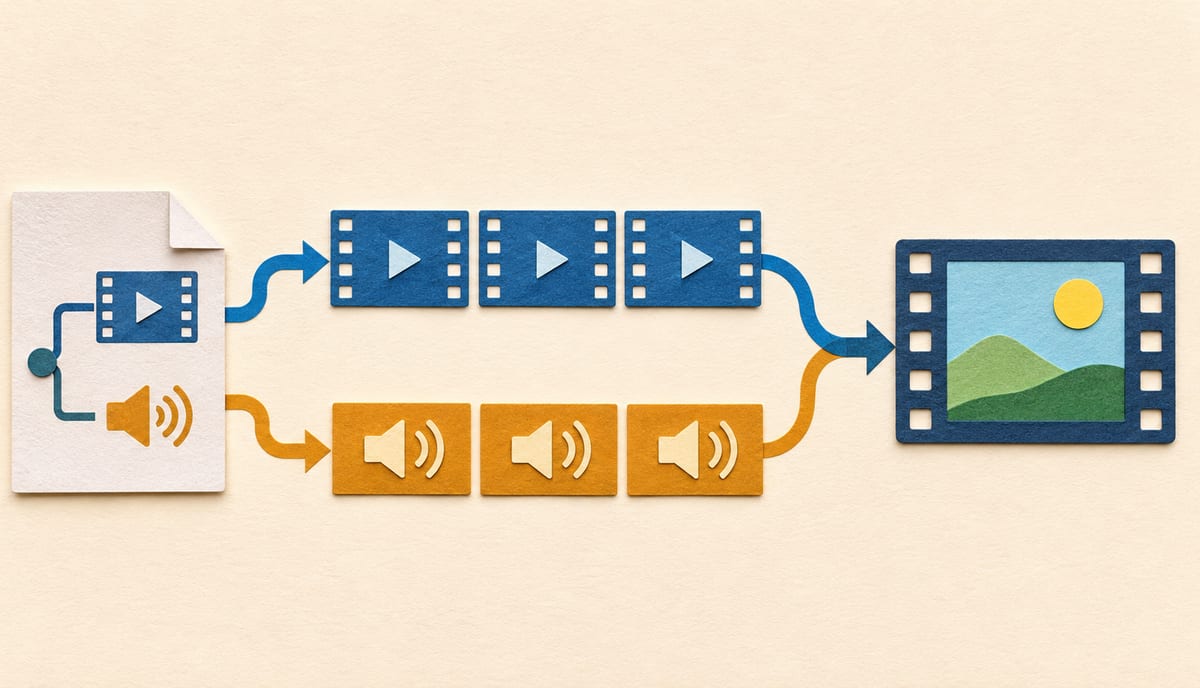
You can’t download a DASH video by saving its .mpd file. That file is a manifest: a small XML document that describes the video and tells a player where to find the pieces. Save it and you get text. To get a video you have to retrieve the pieces it points to, choose the right ones, and put them into a single file a normal player can open.
In Chrome, the practical order is:
- Use the publisher’s own download option if there is one.
- If the stream is supported and unprotected, use a tool that understands DASH. MAX Video Downloader detects DASH on the page, lets you pick a quality and handles separate audio and video tracks.
- If the stream is protected, stop. A DRM-protected presentation is not something a download trick fixes, and this guide doesn’t cover getting around it.
The rest of the article is for readers who want to know why, and who need to tell which of those situations they’re in.
What an MPD actually contains
DASH (Dynamic Adaptive Streaming over HTTP, also called MPEG-DASH) is an adaptive streaming technique. The media is cut into short segments served over ordinary HTTP, and the same content is offered at several qualities so the player can switch as your connection changes. The MPD, short for Media Presentation Description, is the document that lists those resources. As the dash-mpd-cli documentation puts it, a DASH client reads the manifest to decide which assets to request.
A heavily simplified example, written for illustration rather than copied from any real service, shows the idea:
<MPD type="static" mediaPresentationDuration="PT10M">
  <Period>
    <AdaptationSet contentType="video">
      <SegmentTemplate initialization="video/$RepresentationID$/init.mp4"
                       media="video/$RepresentationID$/seg-$Number$.m4s"
                       startNumber="1" duration="4" timescale="1" />
      <Representation id="v1" width="1280" height="720"  bandwidth="2500000" codecs="avc1.4d401f" />
      <Representation id="v2" width="1920" height="1080" bandwidth="5000000" codecs="avc1.640028" />
    </AdaptationSet>
    <AdaptationSet contentType="audio" lang="en">
      <SegmentTemplate initialization="audio/$RepresentationID$/init.mp4"
                       media="audio/$RepresentationID$/seg-$Number$.m4s"
                       startNumber="1" duration="4" timescale="1" />
      <Representation id="a1" bandwidth="128000" codecs="mp4a.40.2" />
    </AdaptationSet>
  </Period>
</MPD>
This is a simplified sketch, not a real service’s manifest. Real manifests are longer, but they are built from the same parts. The SegmentTemplate is the URL pattern: the client replaces $RepresentationID$ and $Number$ to build each segment address.
- A Period is a stretch of the presentation. Many files have one; some have several, for example when an advert or a different part is spliced in.
- An AdaptationSet groups interchangeable versions of one kind of content: the video, an audio language, a subtitle track.
- A Representation is one concrete version inside that group: this resolution at this bitrate with this codec.
- Each Representation says how to find its segments, either by listing them or by describing a URL pattern the client can fill in.
Two consequences matter for downloading. First, there is no single “the video” in the manifest, only a choice between representations. Second, nothing in it says that video and audio live in the same place. In the example, they don’t.
The type attribute is worth a glance as well. static describes a finite on-demand presentation. dynamic marks a manifest that keeps changing, which is how live streams are described, and it’s a harder case that comes up again below.
Why a download can come out silent
DASH commonly packages audio as its own representation instead of repeating it inside every video quality, so the video renditions may carry picture only. This is one possible cause of a silent file, not the only one. Mozilla’s guide to preparing assets for Media Source Extensions shows the output of a DASH packaging run as a stream.mpd next to separate audio and video folders, with several numbered video qualities.
The browser plays both at once, so nothing looks wrong on the page. A downloader that grabs only the highest-quality video representation gives you a perfect picture and no sound. Nothing failed. It saved what you asked for.
Subtitles can be described the same way, as another AdaptationSet. A complete download therefore means choosing at least one video representation and one audio representation, plus any subtitles you want, and then combining them.
Fetching, muxing, and not re-encoding
Turning a manifest into a file is a few distinct steps, and it helps to keep them apart:
- Choose. Pick one representation per kind: a video quality, an audio language.
- Fetch. Request each chosen representation’s segments in order. Any initialization data they need comes first.
- Mux. Place the video and audio into one container such as MP4 or MKV. dash-mpd-cli describes the same sequence: select the alternative with the most appropriate encoding, fetch the segments over HTTP and mux audio and video together.
Muxing is not the same as converting. If the codecs are already suitable for the target container, the encoded data can be copied into a new container with no decode and re-encode step, which is fast and doesn’t lower quality. Re-encoding is only needed when the codecs can’t be combined as they are. MAX copies streams without re-encoding where it can, and when the selected tracks don’t fit one container it switches to a suitable one automatically. The HLS guide goes through the remux versus transcode distinction in more detail, and most of it applies to DASH as well.
How to download a DASH stream in Chrome
Check the publisher first
If you own the video or have been given access, a platform may offer its own download in the account or admin area. That returns the original file without reconstructing anything. It’s also the right route when the service doesn’t permit saving, since nothing a tool does changes that.
Use a tool that reads the manifest for you
MAX works from the page where the video is already playing:
- Install MAX from the Chrome Web Store (free).
- Open the page and start the video so the player requests its manifest and segments.
- Open the MAX popup. The detected video appears with icons showing the streams found, so you can check that an audio stream is present before you start.
- Choose a quality and download.
MAX only sees media the page has actually loaded, which is the same thing you would be hunting for in DevTools. That is why the popup can be empty before playback starts. Pressing play first, or using Force Detection, usually changes that. It works directly in Chrome; the optional desktop app adds native FFmpeg processing and is worth installing for heavier or longer jobs.
MAX supports DASH (.mpd) with separate audio and video tracks when the media isn’t DRM-protected, but this isn’t a promise that every stream works. A few DASH layouts, for instance complex segment index nesting, are listed in the FAQ as unsupported, and a stream that the site deliberately breaks can’t be repaired.
If you want to see the manifest yourself
Open DevTools, go to the Network tab, filter for mpd, and start playback. A response beginning with <MPD is the manifest, usually served as application/dash+xml. Reading it tells you the qualities, languages and codecs on offer, which is useful when you’re deciding between two failed attempts. It’s not a recipe to copy into a command line: segment URLs often rely on signed parameters, cookies or other things the browser session was sending, so a request replayed elsewhere can be refused.
What each outcome means
| What you see | What it usually means | What to do |
|---|---|---|
You saved a small .mpd file |
You saved the manifest, not the media it describes. | Use a DASH-aware workflow that retrieves and combines the segments. |
| The picture is fine, no sound | One possible cause: only a video representation was saved, and audio is a separate track. | Select an audio track as well, or save the audio separately and use it as an external track. |
| The file opens but there’s no audio even with an audio track selected | The audio and video codecs may not combine in the chosen container without conversion, or the manifest described them inaccurately. | Let the tool pick a compatible container such as MKV, or extract the audio on its own. |
The .mpd opens as XML, but the media requests fail with 403 |
The segment URLs may have expired, or they depend on the browser session. | Reload the page, start playback and detect again soon after. If it persists, access may be restricted. |
| Download fails immediately | Unsupported layout, protected content, a broken manifest, or no free disk space. | Check the error details in your download history before retrying. |
The manifest contains ContentProtection entries |
The content is encrypted or protected. A descriptor naming a DRM system, such as Widevine or PlayReady, means DRM. | Stop. MAX doesn’t support DRM-protected media, and you shouldn’t try to defeat it. Use what the service offers. |
The manifest says type="dynamic" |
It’s a live stream, or a replay that is still being published. | Record while the broadcast is running; segments that have already left the live window can’t be fetched later. |
Two of these rows deserve a longer note.
Protection. A ContentProtection element inside the manifest signals that some content is protected or encrypted. Which scheme it is depends on the descriptor: the schemeIdUri and its contents identify a common encryption scheme or a specific DRM system, so read them before concluding anything. Some tools can decrypt content when you supply keys, and the dash-mpd-cli documentation says so openly, but obtaining those keys from a protected service is exactly the thing that is out of bounds here. DASH-IF’s interoperability guidelines treat content protection as its own concern, separate from the on-demand, live, video, audio and text parts, and that matches the practical reality: it’s a separate system, and a plain manifest download doesn’t touch it.
Live manifests. A dynamic manifest keeps publishing new segments, so a download has to follow it as it grows. That is a different task from saving a finished file. dash-mpd-cli says its own support for live manifests is limited. It warns that it doesn’t implement the clock-based timing needed to fetch segments only as they appear. That’s one tool’s limit, not a rule about all tools, but it shows why a live DASH stream is a different job from an on-demand one. MAX can record supported live streams while they broadcast.
Treat .mpd as a clue, not as permission
Finding an MPD only tells you how the player gets the video. It doesn’t tell you the segments are public, complete or yours to keep. If the service offers a download, use that. If a stream is protected or your access depends on a login that the tool can’t reuse, there is no honest shortcut.
For an unprotected, supported stream that you’re allowed to save, though, the answer is short. Let the page load it, pick the quality, make sure audio is included, and let the tool do the fetching and muxing.